Fayez — ASO screenshots for the App Store and Google Play
If you use these links to buy something, we may earn a commission.
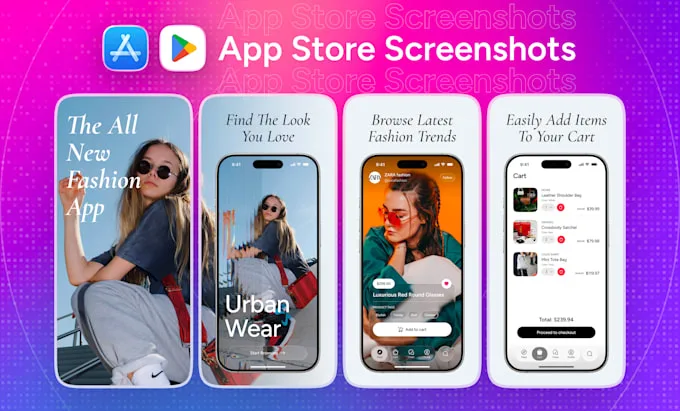
Fayez designs ASO-focused App Store and Google Play screenshots in sets of three, five, or ten. You supply the caption on each frame; he does not draft that copy for you. Message him before you order, and plan on one modern iPhone capture set plus the two store sizes named in the gig unless you agree on iPad or other exports up front.
Why we picked them
The caption rule is the first filter. His FAQ and gig text expect you to write the text that appears on each screenshot. That suits teams that already have marketing lines or ASO keywords and want a designer to build hierarchy and glass-style frames around real UI, not someone to invent the headlines.
Revision counts scale with the set size: four rounds on the three-screenshot tier, six on five, and eight on ten. That pairing is different from sellers who hold revisions flat across packages. Delivery is two days on the smaller tiers and three days on the ten-screenshot tier.
Fiverr lists him as Top Rated. He is based in Bangladesh, on the platform since December 2021, and his profile describes senior UI/UX work in Figma plus React Native development. His seller card carries a long review history; this screenshot listing is newer than that overall track record.
The gig names exact included sizes: iPhone 6.9 inch at 1320 by 2868 pixels and standard Android at 1920 by 3840. iPad 13 inch and other dimensions are not automatic—you agree them before the order. The listing positions the look as trendy, with Liquid Glass or glassmorphism, strong contrast, and clear hierarchy, and it names business apps, games, and health and fitness as fit categories.
What you get
Each tier includes custom assets matching the screenshot count, a source file, and exports sized for both stores within the two named phone dimensions unless you add others in chat.
- Basic: three screenshots, four revisions, and two-day delivery.
- Standard: five screenshots, six revisions, and two-day delivery.
- Premium: ten screenshots, eight revisions, and three-day delivery.
Handoff is upload-ready PNG or JPEG, a preview presentation, and an editable Figma source on every tier. The gig is for marketing screenshots built from captures you send; it does not include redesigning the in-app UI—that is a separate listing on his profile. Hourly hiring is also on the profile if you need a different engagement model.
Add-ons include an extra screenshot page and localization for additional languages when you supply the translated strings. The portfolio sample shown on the gig includes a Dominoes game set, which matches the games category he lists alongside business and health and fitness apps.
If you want the designer to draft the on-image lines, Noha can write or refine them. Dan and Mihai are the other screenshot designers we cover on this site. For hiring logistics, read How to choose an App Store screenshot designer and How to brief an App Store screenshot designer. This listing is for store screenshots; Google Play feature graphic vs screenshots explains how that asset differs from screenshots.
Best fit
- A founder or marketer with finalized caption copy. Fayez expects your line on each screen, so the order moves faster when ASO text is already written and you want layout, glass-style treatment, and contrast handled in Figma.
- A business, game, or health and fitness app with real iPhone UI to show. The gig asks for captures from one modern iPhone and lists those three app types; the portfolio sample is a Dominoes game in the trendy style the listing describes.
- A team that only needs the two named phone exports at launch. iPhone 6.9 inch and standard Android are in the base scope; agree anything beyond that before checkout.
- A buyer who wants scaled revision allowance on larger sets. Eight revision rounds come with the ten-screenshot tier, which can matter when several stakeholders comment on hierarchy and caption placement.
- A repeat buyer building another listing. Reviews on this gig mention clients who return and describe steady communication alongside the visual work.
Who should skip
- You need the designer to write the on-image captions. Fayez expects you to supply caption text for each screenshot; for headline help, consider another seller such as Noha.
- You need iPad 13 inch or many device sizes inside the base package without a custom agreement. Only the named iPhone and Android phone sizes are included unless you confirm extras first.
- You want the app UI redesigned as part of this order. The FAQ separates UI/UX redesign into another gig; this listing builds store art from screens you already have.
- You cannot supply real captures from a modern iPhone. The gig requires your actual app screens, not placeholder mockups alone.
- You need revision turnaround within the same hour. One buyer noted that revision updates sometimes took twelve to twenty-four hours.
What buyers mention
Reviews on this gig emphasize repeat orders, quick overall delivery, responsive communication, and polished results. Several commenters appear to be based in the United States, the United Kingdom, or the Netherlands. The mixed note we saw is timing on revision updates: one buyer said changes sometimes arrived on a twelve-to-twenty-four-hour cycle rather than immediately. We have not tested the screenshots ourselves; the style descriptions above reflect what the gig and portfolio show.
Before you order
- Message Fayez first. Describe the app, who it is for, and whether you want three, five, or ten screenshots. His FAQ treats messaging before ordering as expected.
- Send real captures from one modern iPhone plus the caption you want on each screen. Do not assume he will invent that copy.
- State your target audience if you have one; the gig recommends sharing it so the hierarchy matches the buyer you are chasing.
- Confirm export scope. Verify you are covered for iPhone 6.9 inch and standard Android only, or agree on iPad 13 inch and any other sizes before you pay.
- Ask about add-ons if you need them. Extra screenshot pages and extra languages require agreement, and you supply translated text for each language.
- Confirm deliverables. You should receive PNG or JPEG files ready to upload, a preview presentation, and the editable Figma source named on the gig.
- Keep UI redesign off this order. If the product screens still need a UX pass, use his separate redesign gig or finish the UI before you order screenshots here.
How we reviewed this page
On October 28, 2026 we read Fayez’s gig description, the three packages, the FAQ, the gallery, the portfolio sample, his profile, and buyer reviews on this listing. We have not hired him. Live ratings, packages, and policies can change, so check the current gig before you order. We do not publish prices on this page.